Understanding Modifier Ordering in Jetpack Compose
This article was published in ProAndroidDev so you could also read it here
Okay, so modifier ordering in Compose. This thing has been driving me crazy for months.
I’ll be honest - I was that developer who just moved modifiers around until stuff looked right. Not proud of it, but hey, we’ve all been there, right?
Then I found these two really good blog posts. One by Márton Braun that says “modifiers are applied last-to-first, inside-to-outside” and another by Marcin Moskala that basically says “no, modifiers are NOT applied from bottom to top.”
And I’m sitting here like… wait, what? These sound like they’re saying opposite things.
So I spent some time trying to figure this out, and I think I finally got it. Maybe my way of thinking about it will help you too.
My Simple Rule: Just Read The Damn Thing
After all this confusion, I came up with the simplest possible way to think about it: Modifiers are applied as they are read. Top to bottom, from outside to inside.
Look at this:
fun SimpleExample(modifier: Modifier = Modifier) {
    Box(
        modifier = modifier
            .size(100.dp)
            .background(Color.Blue)
    ) {
        Text("I am a Box")
    }
}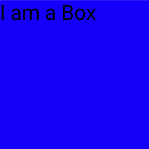
You read it as “a box with size 100dp and blue background” and that’s exactly what you get. A 100×100dp blue box. No tricks, no magic.
This worked for me 90% of the time, and I was pretty happy with this understanding.
Then Padding Happened
The box example below really opened my eyes. Check this out:
    Box(
        modifier = Modifier
            .size(150.dp)
            .padding(20.dp)
            .background(Color.Red)
            .padding(20.dp)
            .background(Color.Green)
            .padding(20.dp)
            .background(Color.Blue)
    )
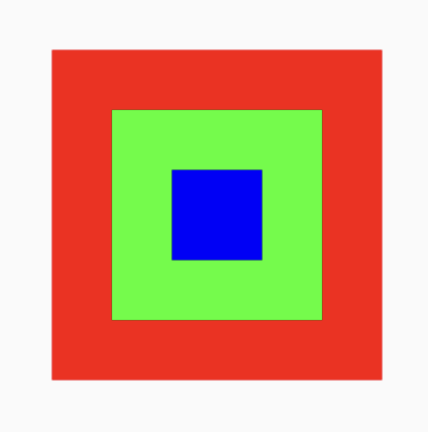
Reading top to bottom and applying from outside to inside: A Box of size 150dp then add padding, paint red, add more padding, paint green, add more padding, paint blue.
Each padding creates space, and each background fills whatever space is available at that moment.
Even if you add any other content composable like:
    Box(
        modifier = modifier.size(200.dp)
    ) {
        Text(
            modifier = Modifier
                .padding(20.dp)
                .background(Color.Red)
                .padding(20.dp)
                .background(Color.Green)
                .padding(20.dp)
                .background(Color.Blue),
            text = "Some Text",
        )
    }
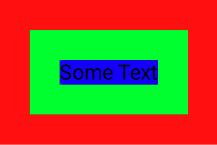
There’s a Box with dimensions 200×200, then spacing of 20dp is applied. Now a red background is applied (as we’re moving outward to inward), the color gets applied to the reduced area. Again padding of 20dp, again a background color, and so on. When all the modifiers have been applied, we can finally draw our Text.
Notice that I applied the modifier parameter before text as it helps me imagine that modifiers are applied before the content is drawn, since modifiers decide how much space the content can take.
┌───────────────────────────────┐
│        Box (200dp)            │
│  ┌─────────────────────────┐  │
│  │    Red (padding 20dp)   │  │
│  │  ┌───────────────────┐  │  │
│  │  │ Green (pad 20dp)  │  │  │
│  │  │ ┌─────────────┐   │  │  │
│  │  │ │Blue (20dp)  │   │  │  │
│  │  │ │ Some Text   │   │  │  │
│  │  │ └─────────────┘   │  │  │
│  │  └───────────────────┘  │  │
│  └─────────────────────────┘  │
└───────────────────────────────┘
This still fit my “read as you go” model perfectly. I was feeling pretty confident.
When Everything Broke
Box(
    modifier = Modifier
        .size(200.dp)
        .background(Color.Blue)
        .size(100.dp)
)
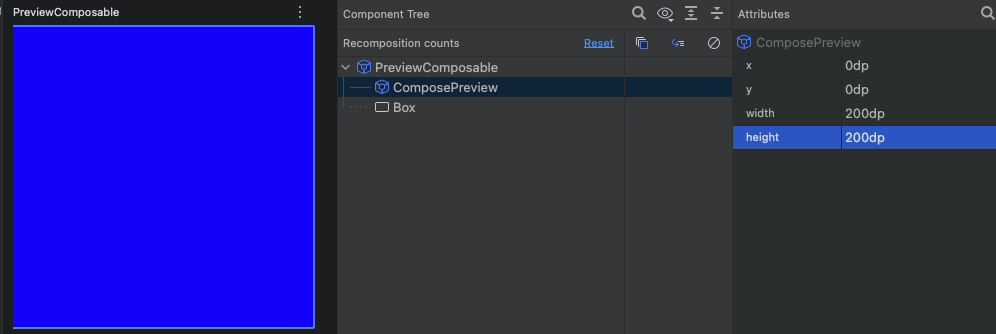
My brain: “200dp size, blue background, then resize to 100dp. Should be a 100×100dp blue box.”
Reality: Nope. Still a 200×200dp blue box.
Here’s another one:
    Box(modifier.size(100.dp)) {
        Image(
            painter = painterResource(R.drawable.ic_launcher_background),
            modifier = Modifier
                .fillMaxSize()
                .size(30.dp)
                .offset(30.dp, 30.dp),
             contentDescription = null
        )
    }
My expectation: “Fill the parent (100dp), resize to 30dp, offset by (30,30). Should be a tiny 30×30dp image moved to position (30,30).”
So the output should be:

Reality: Nope. The output is:
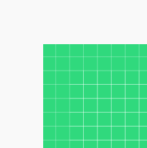
The size(30.dp) modifier was completely ignored!
What the hell? The second size modifier did nothing?
Breakthrough!
I realized if I go back to square one and remember that “modifiers are applied last-to-first, inside-to-outside,” from Márton Braun’s article the outputs I’m getting are correct because if I read the modifiers from last to first, the fillMaxSize() will override the size() modifier and the result will make sense. But does this overriding actually happen? The answer is No.
The Real Explanation
Modifiers don’t just “set sizes” - they work with something called constraints. Think of constraints as rules about how big or small something can be.
When you use size(200.dp), you’re not just saying “make this 200dp.” You’re saying “this MUST be exactly 200dp - no smaller, no bigger.”
So when you later add size(100.dp), it’s trying to say “this MUST be exactly 100dp,” but it can’t, because the previous size modifier has already locked the constraints to exactly 200dp. The modifier chain continues with those constraints—they don’t change.
It’s like if someone tells you “you must be exactly 6 feet tall” and then someone else says “you must be exactly 5 feet tall.” The second rule can’t work because you’re already locked into the first one.
Testing This Theory: Multiple Size Modifiers
Let me show you a few examples I tested to confirm this:
Example 1: Double Size
Box(
    modifier = Modifier
        .size(150.dp)
        .background(Color.Red)
        .size(75.dp)
        .background(Color.Green)
)
Result: 150×150dp box. Red background gets applied to the full 150dp area, then green background also gets applied to that same area (so you only see green). The size(75.dp) does nothing.

Example 2: Triple Size Chain
Box(
    modifier = Modifier
        .size(200.dp)
        .size(100.dp)
        .size(50.dp)
        .background(Color.Blue)
)
Result: 200×200dp blue box. Only the first size modifier matters.

Checkpoint: So far we’ve learned that we can think of modifier order from top to bottom, outside to inside, with repeated size modifiers having no effect.
Here are some cases that also need to be looked at:
Example 3: Size After Padding
Box(
    modifier = Modifier
        .size(120.dp)
        .padding(10.dp)
        .size(80.dp)
        .background(Color.Yellow)
)
Here, a padding modifier lies between two size modifiers. Using padding(10.dp) is like creating a virtual area that has spacing of 10dp from the boundary of the box outside it. So now when you set size(80.dp), it’s being set for the inner area which is 10dp from the outside boundary. Also, 80dp fits within the available space after padding.
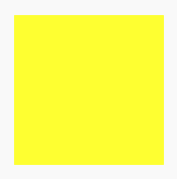
This isn’t limited to the padding modifier - think of it more as a concept, so it can be extrapolated. I tried the same with the wrapContentSize() modifier and the result was in line with this understanding.
What I Learned
So yeah, both those blog posts were right, just explaining different aspects:
- Márton’s “last-to-first, inside-to-outside” helps you think about decoration and visual layering
- Marcin’s constraint-based explanation helps you understand why certain modifiers seem to get “ignored”
My “read as you go” approach works most of the time, but you need to understand that size-related modifiers create hard constraints that later modifiers have to respect.
The Real Takeaway
Instead of memorizing complex rules about modifier ordering, I just remember this:
- Read it naturally - most modifiers work exactly like you’d expect
- First size wins - when multiple size modifiers conflict, the first one locks it in
- Constraints flow down - each modifier receives constraints from the previous one and might modify them
This isn’t the most technically precise explanation (the constraint system is more complex), but it’s the mental model that actually works for me day-to-day. I stopped playing “modifier roulette” and started being able to predict what my UI would look like before running it.
Hope this helps you get out of the trial-and-error loop too!